 PetDoing
PetDoing Originals · Browser game
Pet Card Flip
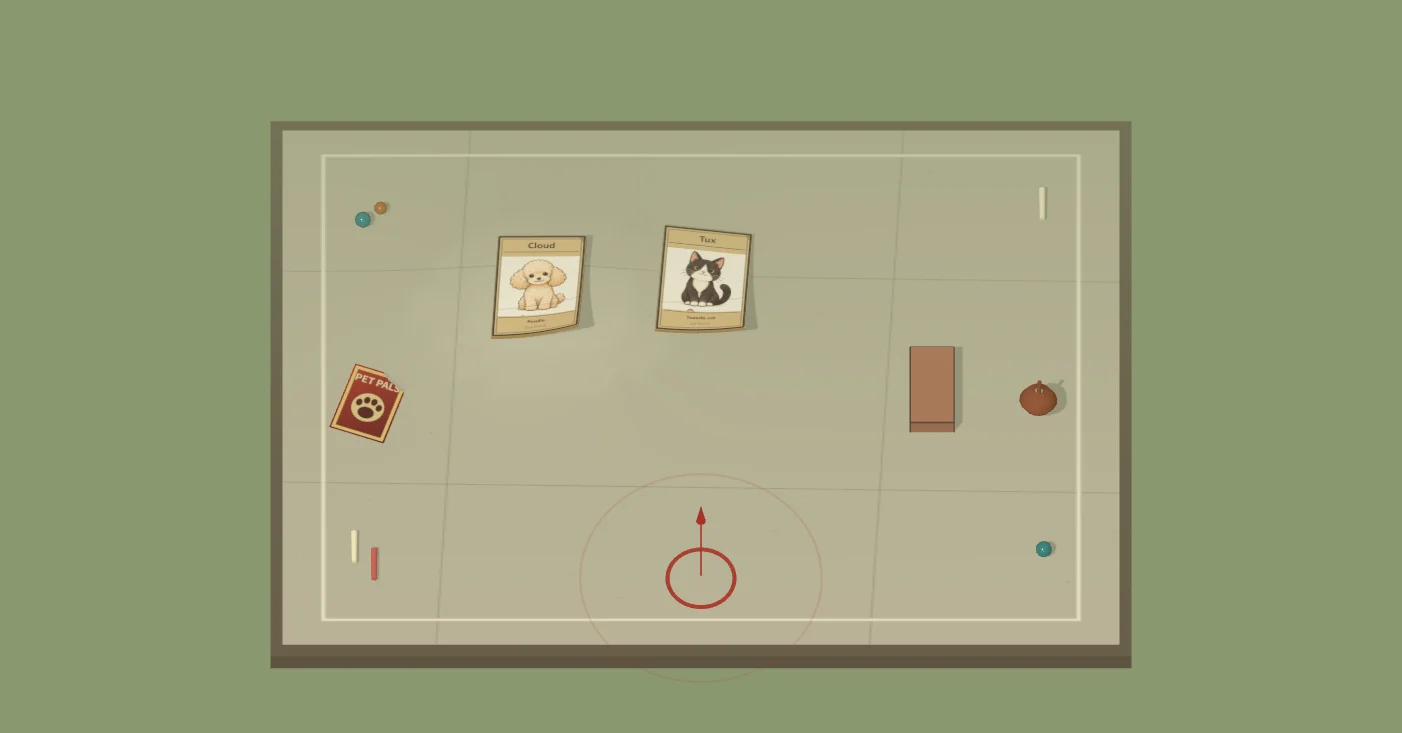
Pick a pet card. Aim beside a target, pull back and release to flip it.
Start in three steps
- 1Pick a card
Choose a pet from your hand.
- 2Aim and pull
Lock a landing point; pull away from the strike direction.
- 3Release
A flip counts when the card settles on its other face.
- Drag
- Aim + strength
- Esc
- Cancel
- Guided slap
- Button alternative
WebGL + WebAssembly. Mouse, touch and buttons; optional phone motion needs permission and compatible sensors. Desktop scenes checked in Chrome. Actual phone feel still needs device testing.
Full rules, controls and browser support
Your first round
- Pick a mode. The menu labeled “Mode” starts in “Card match” (card match). Choose “Practice” for practice.
- Choose a card. Both sides bring six cards and put one on the table, leaving five in each hand. Select a pet from your hand before your turn.
- Aim beside a target. Press on an open patch near a card to lock the landing point. Pull away from the direction you want to strike. The arrow shows the direction; a longer pull means more power.
- Release to play. Air impulse and contact can lift the paper cards. A successful flip must settle on the opposite face; a brief wobble does not count.
- Keep playing or hand over. Flip at least one card and you get those cards plus your played card back, then take another turn. Miss and your card stays where it lands; the computer takes its turn.
What ends a match?
The game checks hands after a shot settles. Playing your last card is not an instant loss: a successful flip can bring cards back. A side with no cards after settlement loses. When the table is cleared, both sides contribute one card from their hands to continue. Cards still on the table at the end are not awarded as a bonus.
Practice focuses on learning the strike and collecting flips. Switch modes during your preparation turn or after the round; switching lays out a fresh table.
Controls at a glance
- Mouse or one finger: press to choose the landing point, drag to set power and direction, release to strike. A tap without a pull does not play a card.
- Cancel: drag into “Cancel” or outside the arena before releasing. On a keyboard, press Esc; a right click also cancels.
- Button alternative: “Guided slap” makes a guided strike on your turn, so you can try the game without dragging.
- Look closer: use + / − or the mouse wheel. The percentage button restores the full view. Right-drag moves the view; compatible touchscreens can use two fingers to zoom.
- Paper and terrain: try different surfaces, paper finishes and bends between shots. Your striking card and the ground cards have separate bend controls.
- Sound and reset: use “Sound on / Sound off” to toggle sound. “Reset table” starts the current mode again.
Phone motion: aim, lock, swing
Tap Motion play, allow motion and orientation, then hold your phone still for one second. Tap the table or Aim at edge to choose a landing point. Tilt gently, tap Ready to lock the angle, and make a small downward swing. Lifting first does not play a card. Each preparation plays at most one card; tap again or press Cancel to stop without spending a card.
Steady power starts at Medium, 65%. Soft, Medium and Strong keep the selected power while the swing triggers the shot. In Motion settings, choose Measure my swing and Learn my swing for a no-card practice swing. The game adapts that comfortable swing to about 75%; this is a game control, not a measurement of real force.
Hold your phone firmly. Use small movements; never hit the table or let go. Rotating the screen, leaving the page, interrupted sensors or an eight-second preparation timeout cancels the pending swing. Recalibrate when prompted. Sensor readings stay on your device. Use touch remains available if permission or sensors are unavailable.
Three things to try
Change the gap, not everything at once. Start with the default courtyard and make two medium-strength strikes at different distances from a target. Watch whether the edge lifts or the card simply slides.
Compare flat and curled paper. A raised edge offers air a different opening, while a crease changes how the card contacts the ground. Keep the landing point similar to notice the difference.
Try the wooden table. Then switch to grass or sand. Friction, bounce and air loss are game parameters, so the same strike can settle differently. A harder strike is not always the most useful one.
Meet your paper companions
Mango (orange tabby), Sunny (golden retriever), Mochi (British shorthair), Biscuit (corgi), Tux (tuxedo cat), Cloud (poodle), Patch (calico), Maple (shiba inu), and Snow (white longhair).
The pets are fictional illustrated characters. Their portraits are cosmetic: choosing a cat or dog does not give extra strength. The artwork was generated with AI for this adaptation; it is not a photograph of a real animal.
Browser support and your progress
Use a current browser with WebGL and WebAssembly enabled. The initial download includes a 3D physics engine and may take a moment on a slow connection. If the table does not appear, refresh once or try another current browser with hardware acceleration.
Play with a mouse, touch controls, or optional phone motion on this HTTPS page. Motion needs compatible Android Chrome or iPhone Safari and your permission. Desktop layout and simulated sensor flows are tested; real phone feel still needs testing. A smaller screen may require scrolling to reach your hand and paper settings.
This game runs locally in your browser and does not save matches. Refreshing or leaving the page resets the round. There are no purchases, prizes or cash rewards.
About this game
PetDoing adapted its independently developed paper-card game into a pet-themed courtyard. The game combines 3D collisions with an approximation of a slap's air impulse; it is a playful simulation rather than a physical measurement tool. Card matches and paper experiments are intended for people to enjoy on screen.
About PetDoing · Practical pet guides · Report a game problem